A visitor clicks an ad inside ChatGPT, lands on your site, browses for a while, and buys three days later. Whether OpenAI Ads Manager shows that sale depends on one query-string parameter, oppref, surviving the landing, and on a pixel or a server call carrying it back to OpenAI. If a redirect strips the parameter, or the consent banner holds the pixel back until the URL has changed, the sale still happens but the ad gets no credit.
This guide is for people who run or audit tracking. It explains what OpenAI documents today about ChatGPT Ads measurement, what you can and cannot measure, how to set up the pixel and the Conversions API (CAPI), how to check that it works, and what it changes in a GTM, server-side and consent setup. It is built from OpenAI’s own developer documentation and Help Center. I have not run a paid ChatGPT Ads campaign for it, so nothing here is a measured result. Where the documentation is silent, I say so.
Status on 19 November 2026: OpenAI labels the product “Ads Manager Beta”, and the documentation changes often. Re-read the pages in the Sources section before you build anything.
The short version
- What oppref is: an opaque click reference that ChatGPT Ads appends to the landing page URL, for example
?oppref=gAAAAAb123. You must pass it back to OpenAI untouched. - Who captures it: the JavaScript pixel reads it from the URL and stores it in a first-party
__opprefcookie. The Conversions API and the image tag do not: you capture it yourself. - Cookie lifetime, settled: OpenAI’s pixel documentation says 30 days for
__opprefand 365 days for__obref. I found no OpenAI page that says 90 days. The attribution window is a separate setting: 7, 14 or 30 days for clicks. - Best setup: pixel plus CAPI, same
event_idon both sides,opprefforwarded with the server event whenever you have it. - What breaks it: redirects that drop query strings, a pixel that loads after consent on a later page, a pixel only on some pages, events fired before the conversion is real, and GTM tags that fire without the pixel actually sending.
- How to check: Ads Manager test session, the Network tab, the
__opprefcookie, a redirect trace with curl, and the sample of recent events from the API.
Context: what changes for measurement
Before. Ads inside the ChatGPT conversation are a new channel, still labeled beta, with its own click identifier, its own pixel and its own reporting.
What changes. OpenAI now documents a full measurement stack: a browser pixel, an image tag for pages without JavaScript, a server-side Conversions API, and a reporting layer with configurable attribution windows. For a tracking owner this is one more ad platform to wire into the tag manager, the consent banner and the CRM.
Why it matters. The click does not carry a third-party cookie or a platform account you can join to. The only thing that links the ad click to a later sale is the oppref value plus, where you send it, hashed customer data for advanced matching. If that link breaks, the platform cannot tell your campaign worked, and conversion-based bidding learns from less data.
Better or worse. Better, because a server route exists and the documentation is specific about fields, hashing and deduplication. Worse, because the identifier is easy to lose in ordinary site plumbing (redirects, banners, single-page navigation), and because OpenAI’s totals will not match your analytics: the Help Center lists different attribution methods, windows, time zones, consent conditions, deduplication and modeled conversions as normal reasons.
How a conversion gets measured
The Help Center states four conditions for a conversion to be reported: OpenAI receives an event from a data source connected to your ad account, the event matches a conversion event configured for the campaign, it falls inside the applicable attribution window, and OpenAI can connect it to an eligible ad click using “available measurement signals”. Those signals include the click reference (oppref), eligible advanced matching data, and modeled measurement where available.
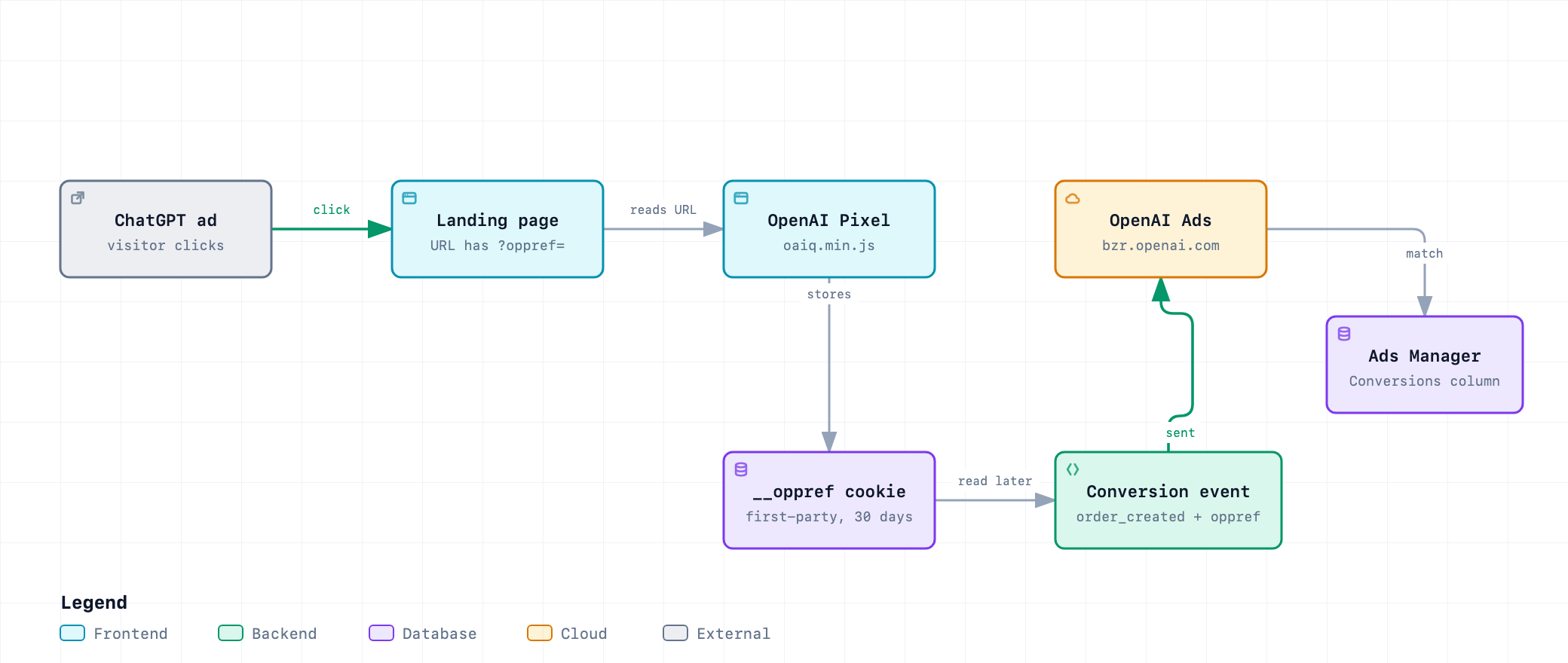
In pixel terms the sequence is short. The pixel “captures oppref from the landing page URL”, stores it in the first-party __oppref cookie so later page views can reuse it, adds the page origin as source_url, timestamps each event and batches events that fire close together. Every time it sees a non-empty oppref parameter, including the same value again, it resets the cookie to 30 days. Reading the cookie on a visit without the parameter does not extend it.
What you can measure today
| Capability | What OpenAI documents | Where |
|---|---|---|
| Click-through conversions | Counted when the event matches a configured conversion and falls in the click window (7, 14 or 30 days, your choice in Ads Manager). Last-touch logic, not multi-touch. | Measure Results |
| View-through conversions | Fixed 1-day window after an eligible impression, reported as a separate campaign-level metric. A click takes precedence. Bidding, billing, CPA and optimization stay click-through-based. | Measurement Pixel |
| Server-side events | CAPI accepts up to 1,000 events per batch; if one event fails, the whole batch fails. Timestamp must be within the last 7 days. | Conversions API |
| Advanced matching | Hashed email, phone, external ID, names and location, set manually in the pixel (init user object) or in CAPI. Automatic advanced matching is on by default outside Japan. |
Conversion Measurement |
| Modeled conversions | Where available, OpenAI may estimate attribution for otherwise unattributed events. Reported totals may include modeled conversions. | Conversion Measurement |
| Order value | Order Created Sales and Order Created ROAS are computed only from attributed order_created events. |
Measure Results |
| Reporting time basis | Default is the time of the ad click or impression that got credit. A “by conversion time” column exists. | Measure Results |
What is missing or limited
- Delay. Attributed conversions can take 24 to 48 hours to appear, and recent totals can change. Spend is delayed by roughly 7 to 8 hours. Do not judge a campaign on yesterday’s conversion column.
- No raw click-level export in the sources I read. Ads Manager is built to show campaign performance, not individual-level activity. The CSV export gives campaign, ad group and ad level rows. You cannot join a ChatGPT click to a GA4 session by an OpenAI identifier.
- Native app measurement. The pixel does not support
app_installedorapp_opened, and the CAPI documentation says native mobile SDK setup and mobile data sources are not currently supported. App lifecycle events go through CAPI withaction_sourceset tomobile_app, using a Pixel ID from a web data source. - View-through does not optimize. It appears in reporting only. Bidding and optimization use click-through conversions.
- Replay. If consent is
false, the pixel sends no measurement pings, and blocked events are not replayed when consent turnstruelater. - Totals differ from analytics. OpenAI says so itself and adds that “a difference does not necessarily indicate an error”.
- Benchmarks. I found no OpenAI-published performance benchmarks. The only reference point you can build is your own margin.
Where oppref gets lost
OpenAI’s Help Center tells advertisers to preserve oppref “through redirects and landing-page navigation”, and the pixel can only read what is in the URL when it runs. Any step between the click and that moment can lose it.
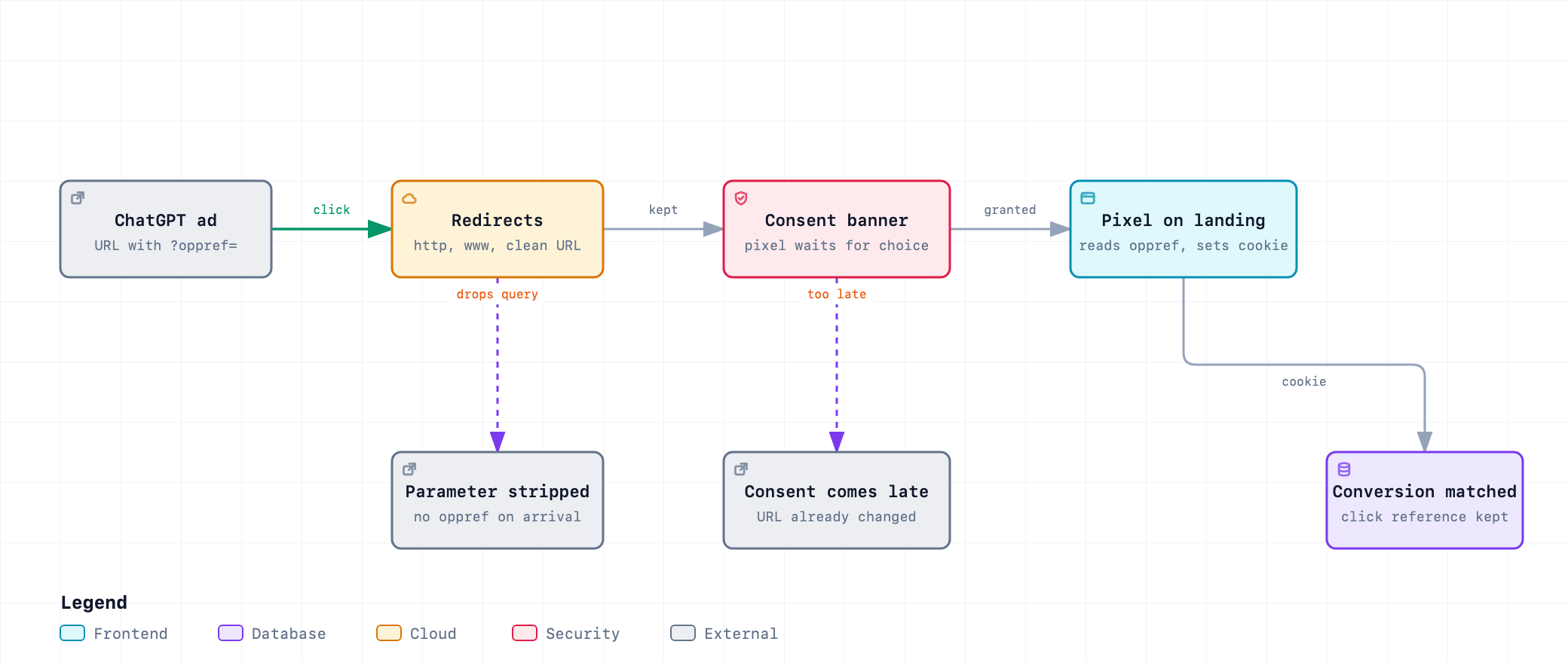
| Loss point | What happens | How to check | Fix |
|---|---|---|---|
| Redirect that drops the query string | http to https, apex to www, campaign URL to “clean” URL, trailing-slash or language redirect: the final URL has no oppref. |
Run the redirect trace below on the exact ad URL. | Make every redirect rule keep the query string. Test after each change to redirects, CDN or WAF rules. |
| Landing on a page without the pixel | The pixel is installed on some templates only. OpenAI says to add it to the <head> of every page where you want to capture conversions, near the top. |
Land on each template type with a test parameter and look for oaiq.min.js in the Network tab. |
Install on all pages. The ad can land anywhere you point it. |
| Consent decision after the URL changes | The pixel waits for consent, the visitor accepts on page 2, and the URL no longer has oppref. Unverified: the documentation does not say whether the pixel records the parameter while consent is false. |
Test with consent denied at landing, then granted on the next page, and read the cookie. | Show the banner on the landing page, before navigation. Ask your DPO before storing the value yourself ahead of consent. |
| Single-page app navigation | The router rewrites the URL before the pixel script has run. Hypothesis, not in OpenAI’s documents. | Load the landing URL cold and watch the first Network request to bzr.openai.com. |
Load the pixel in the document head, not after the first route change. |
| Cross-domain checkout | The cookie is first-party on the landing domain. A checkout on another domain cannot read it. Inference from the cookie being first-party. | Compare the cookie domain with the checkout domain. | Send events from the landing domain, or pass the value to the server and use CAPI. |
| Event fired too early or twice | Firing on a button click, not on the confirmed conversion, or on every reload of the thank-you page, measures intent or duplicates. | Reload the thank-you page and count events in the test view. | Fire when the order or lead is confirmed, once, with a stable event_id. |
How to set it up
Step 1: create the data source
In Ads Manager, open the conversions tab and create a data source. You get a Pixel ID and, for CAPI, an API key. Approved API partners can provision both with the conversion setup endpoints. Then create the conversion events in Ads Manager and attach them to the campaign before traffic starts. If a custom event shows 0, the name must match exactly and the type must be Custom; a matching display name is not enough, and events from a mismatched setup are not backfilled (Help Center, Measure Results).
Step 2: install the pixel, with consent in order
OpenAI provides the snippet, loaded from https://bzrcdn.openai.com/sdk/oaiq.min.js, to place near the top of the <head> on every page. The consent switch must be set before init: the pixel treats consent as true by default unless you set false or it finds a stored denial. This is the same snippet with the consent calls added. It passes a syntax check; I have not run it against a live Pixel ID.
(function (w, d, s, u) {
  if (w.oaiq) return;
  var q = function () {
    q.q.push(arguments);
  };
  q.q = [];
  w.oaiq = q;
  var js = d.createElement(s);
  js.async = true;
  js.src = u;
  var f = d.getElementsByTagName(s)[0];
  f.parentNode.insertBefore(js, f);
})(window, document, "script", "https://bzrcdn.openai.com/sdk/oaiq.min.js");

// Consent must be set before init: no measurement pings until the visitor has chosen.
oaiq("consent", false);
oaiq("init", { pixelId: "YOUR-PIXEL-ID" });

// Call from your CMP's "marketing accepted" callback.
function onMarketingConsentGranted() {
  oaiq("consent", true);
}

// Call when the visitor withdraws consent (the docs say consent=false removes both cookies).
function onMarketingConsentWithdrawn() {
  oaiq("consent", false);
}
If your site sends a Content Security Policy, add https://bzrcdn.openai.com to script-src, both https://bzr.openai.com and https://bzrcdn.openai.com to connect-src, and https://bzr.openai.com to img-src. OpenAI advises against adding 'unsafe-inline' just for the pixel.
Step 3: fire events when the conversion is real
Use a standard event name when one fits: lead_created, order_created, checkout_started, items_added, contents_viewed, page_viewed, registration_completed, appointment_scheduled, subscription_created, trial_started, or custom. Amounts are integers in the currency’s minor unit, so 2599 means 25.99 with currency: "EUR". Set your own event_id as soon as you also plan to send the event from the server.
oaiq("measure", "order_created",
  { type: "contents", amount: 2599, currency: "EUR" },
  { event_id: "order_12345" });
That line comes from the OpenAI documentation pattern (order_created with the contents data shape and event_id in the options). Illustrative, untested against a live pixel.
Step 4: through Google Tag Manager
OpenAI’s Help Center says you can deploy the pixel through a tag manager as long as it loads the snippet on the right pages and does not block or reorder initialization and event calls. It adds one warning: a GTM tag firing alone does not confirm event delivery. Check the request in the Network tab.
- Use one Custom HTML tag for the snippet with the consent line, firing on All Pages as early as the banner allows (Initialization trigger, if your CMP loads before it).
- Add a second tag, fired by your consent-granted event, that calls
oaiq("consent", true). - Fire
measurecalls from the samedataLayerevent that already carries your GA4 purchase or lead, and reuse the order or lead ID asevent_id. - A third-party GTM template for the pixel exists (Data Marketing School, listed in Sources). I did not test it, and OpenAI does not endorse it in the pages I read.
Nothing in OpenAI’s documents links the pixel to Google Consent Mode. Treat oaiq("consent") as its own switch and map it to the marketing category of your CMP.
Step 5: add the Conversions API
CAPI is a plain HTTPS POST to https://bzr.openai.com/v1/events?pid=<PIXEL-ID> with a bearer API key. Send it from your server only: the pixel documentation says not to call the server API from page code, and the key must stay secret. Unlike the pixel, the API does not capture oppref for you.
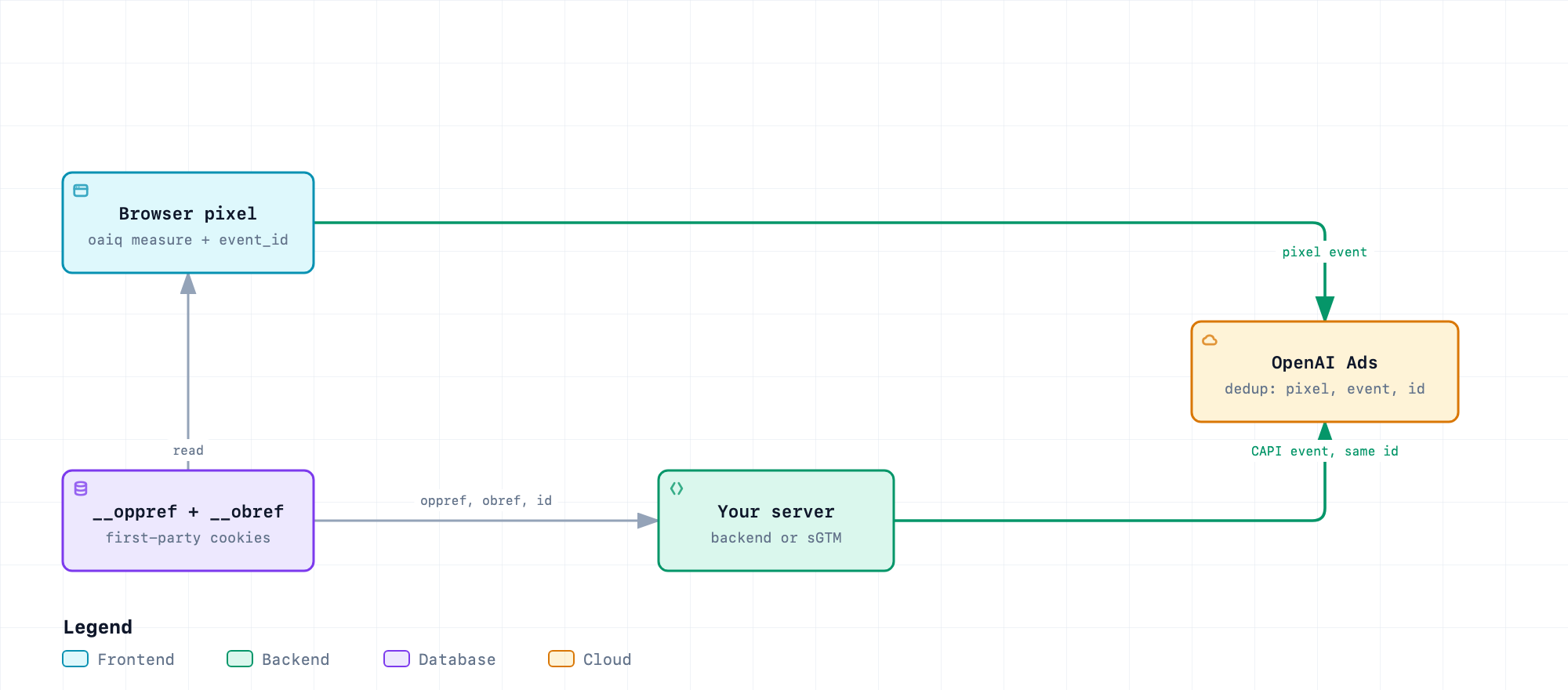
The hybrid pattern in the documentation is: read the __obref cookie in the browser, send it to your server, and include it unchanged as events[].user.obref. Do the same with oppref, but at event level, not inside user. Before you collect or forward either cookie, follow your measurement consent rules, and stop if the user revokes consent. Send all conversion events, not only the ones that have an oppref: OpenAI says the others feed view-through reporting.
The browser side reads the two cookies after consent and posts them with the shared event_id:
// Runs on the order confirmation page, after the visitor has accepted marketing cookies.
function readCookie(name) {
  const match = document.cookie.split("; ").find((row) => row.startsWith(name + "="));
  return match ? decodeURIComponent(match.split("=").slice(1).join("=")) : null;
}

function sendConversionToServer(orderId) {
  const payload = {
    event_id: "order_" + orderId, // same value as the pixel event_id
    oppref: readCookie("__oppref"), // may be null: send the event anyway
    obref: readCookie("__obref"),
    source_url: location.href
  };
  return fetch("/api/openai-conversion", {
    method: "POST",
    headers: { "Content-Type": "application/json" },
    body: JSON.stringify(payload),
    keepalive: true
  });
}
The server side builds the event and posts it. It starts in validate_only mode so nothing is saved while you test:
import { createHash } from "node:crypto";

export const sha256 = (value) => createHash("sha256").update(value, "utf8").digest("hex");
export const normalizeEmail = (email) => email.trim().toLowerCase();
export const normalizePhone = (phone) =>
  phone.replace(/[\s().-]/g, "").replace(/^\+/, "").replace(/^0+/, "");

export function buildEvent({ eventId, oppref, obref, sourceUrl, amountMinor, currency, email, ip, userAgent }) {
  const user = { ip_address: ip, user_agent: userAgent };
  if (obref) user.obref = obref; // belongs in user, unhashed
  if (email) user.emails_sha256 = [sha256(normalizeEmail(email))];
  const event = {
    id: eventId, // reuse the pixel event_id
    type: "order_created",
    timestamp_ms: Date.now(),
    source_url: sourceUrl,
    action_source: "web",
    user,
    data: { type: "contents", amount: amountMinor, currency }
  };
  if (oppref) event.oppref = oppref; // event level, untouched
  return event;
}

export async function sendToOpenAI({ pixelId, apiKey, events, validateOnly = true, endpoint = "https://bzr.openai.com/v1/events" }) {
  const res = await fetch(`${endpoint}?pid=${encodeURIComponent(pixelId)}`, {
    method: "POST",
    headers: { Authorization: `Bearer ${apiKey}`, "Content-Type": "application/json" },
    body: JSON.stringify({ validate_only: validateOnly, events })
  });
  return { status: res.status, body: await res.text() };
}
I ran a local test of this server code against a mock HTTP endpoint. It checks the phone normalization example from the OpenAI documentation (+1 (415) 555-2671 becomes 14155552671), the SHA-256 output length, that oppref sits at event level and obref inside user, that an event without oppref omits the field, and that the request carries the pid parameter, the bearer header and validate_only. It did not call OpenAI, so the real API behavior is untested.
If your server-side tagging runs in an sGTM container, the same call is an HTTP request from a custom tag or template. That is my inference, not something OpenAI documents. I did not find an OpenAI-provided sGTM template in the pages I read.
Step 6: no JavaScript? Use the image tag
For a page that loads without scripts, OpenAI documents a 1 × 1 image request to https://bzr.openai.com/v1/sdk/events with the Pixel ID, the event name and data[...] fields. It sends one event per request, cannot batch, has no user object, and does not capture oppref. Render it only after consent. Never put personal data, session IDs or order IDs in its query string. It can also serve as a <noscript> fallback for the pixel.
Consent and privacy
| Item | What OpenAI documents | Consequence for you |
|---|---|---|
__oppref cookie |
First-party, 30 days after the pixel writes it; the expiry resets when a non-empty oppref is captured again. |
Declare it in your cookie list with name, purpose and duration, in the marketing category. |
__obref cookie |
First-party random browser reference, 365 days, not extended on reuse. | Same declaration. It is the value you forward in user.obref for CAPI. |
| Consent API | oaiq("consent", false) before init stops measurement pings. consent=false removes both cookies. |
Wire grant and withdrawal to your CMP. Blocked events are not replayed. |
| Browser limits | OpenAI notes that browser restrictions or clearing cookies can shorten the lifetimes. | Do not promise 30 days of attribution; expect less in browsers with strict storage rules. |
| CAPI data | Follow your site’s measurement consent before collecting or forwarding the cookie; stop if consent is revoked. Do not send raw emails or phone numbers. | Hash with SHA-256 after normalization. Keep the API key on the server. |
| Personalization | OpenAI states it does not currently use pixel or CAPI data for user-level personalization and will respect the opt_out flag if that changes. |
Set opt_out deliberately if your privacy notice needs it. |
This section is not legal advice. Whether the pixel needs consent on your site, and whether storing the click reference before consent is acceptable, is a question for your DPO and your CMP configuration. What the documentation does give you is a switch that keeps the pixel silent until the visitor chooses.
Cookie lifetime and attribution window: 30 days, not 90
Two different clocks are easy to confuse.
- Cookie expiry. The pixel documentation lists 30 days for
__opprefand 365 days for__obref, and says expiry is separate from attribution windows and conversion-data retention. A third-party guide (Synlig) gives the same 30 and one-year figures. - Attribution window. In Ads Manager you choose a 7-, 14- or 30-day click-through reporting window and a 0- or 1-day view-through window. The choice affects reporting only, not optimization, bidding or billing.
I looked for a 90-day figure in every OpenAI page I read and found none. A 90-day number may come from a source I did not see, or from another platform; treat it as unsourced until OpenAI publishes it. A 30-day click window plus a 30-day cookie also means a visitor who returns on day 35 and buys cannot be tied back to the ad through the cookie.
How to check and audit
1. Trace the redirects
Take the exact ad URL, with a fake parameter, and follow every hop. The script prints the final URL and each location header. If oppref is not in the final URL, a rule is dropping it.
#!/bin/sh
# Usage: ./redirect-check.sh "https://example.com/landing?oppref=TEST123&utm_source=chatgpt"
# Prints every hop and the final URL, so you can see where oppref disappears.
curl -sIL -o /dev/null -w '%{url_effective}\n' --max-redirs 10 "$1"
curl -sIL --max-redirs 10 "$1" | grep -i '^location:'
I ran it against a site I control with http://fasilytics.fr/?oppref=TEST123&utm_source=chatgpt. It made one hop to https://www.fasilytics.fr/?oppref=TEST123&utm_source=chatgpt, so that redirect keeps the query string. This checks redirect handling only, not the pixel.
2. Check the pixel in the browser
- Open the landing URL with a test
opprefvalue in a clean browser profile and accept marketing cookies. - In the Network tab look for
oaiq.min.jsfrombzrcdn.openai.com, a configuration request to the same host, and event requests tobzr.openai.com. Blocked requests point to a CSP rule. - In Storage, confirm
__opprefholds your test value and__obrefexists. Then deny consent and confirm both are gone. - Set
debug: truein the init options while testing, and remove it afterwards.
3. Use the Ads Manager test session
Under Conversions > Data Source, open the three-dot menu on the web pixel, select Test, enter a page where the pixel is installed and start testing. Events from the session carry a Test label in the Event Stream. Labeling lasts up to 30 minutes, applies to the origin you opened (other domains and subdomains do not join), may show only a sample at high volumes, and test events still count in normal analytics.
4. Read recent events from the API
The Troubleshooting page documents a GET https://api.ads.openai.com/v1/conversions/events call with the pid parameter. It returns a sample from roughly the last 15 minutes. Browser events show pixel_sdk and server events show server_to_server, so you can see which channel sent what. For attributed results and history, use Insights, not this sample. You can also send CAPI batches with validate_only: true to check the payload without saving it.
5. Compare with analytics, on the same terms
Add UTM parameters to the ad URLs as well: the pixel feeds OpenAI’s numbers, UTM feeds yours in GA4. Ads Manager supports dynamic URL parameters with the macros {campaign_id}, {ad_group_id}, {ad_id} and {ad_account_id}, set at ad URL, ad, ad group or campaign level, with the more specific setting winning. Compare the same dates and time zone, and remember the 24 to 48 hour delay. When the clicks in Ads Manager exceed GA4 sessions, check page load, redirects, consent and UTM handling before blaming either tool.
Audit checklist
- Pixel in the
<head>of every template, with no second copy of the snippet. - Consent set to
falsebefore init, granted and withdrawn from the CMP, tested both ways. - Redirect trace keeps
opprefand UTM parameters on the real ad URLs. - One event per confirmed conversion, with a stable
event_id, checked by reloading the thank-you page. - CAPI events carry the same
event_id,opprefwhen available,obrefafter consent, and hashed identifiers normalized as documented. - Conversion events in Ads Manager match the event types and custom names you send, and are attached to the campaign.
- CSP allows the three OpenAI hosts listed above.
- Cookie table and privacy notice list
__opprefand__obref. - A written comparison rule between Ads Manager and GA4: dates, time zone, attribution window, delay.
What it changes in a tracking setup
| Area | Before ChatGPT Ads | With ChatGPT Ads |
|---|---|---|
| Tag manager | Google, Meta, other pixels | One more pixel with its own consent switch, loaded from bzrcdn.openai.com. A fired tag is not proof of a sent event. |
| Server-side | sGTM or backend forwards to known platforms | A new HTTPS endpoint with a secret key. The click reference and browser reference must travel from the browser to the server. |
| Consent | Marketing category covers Google Ads and Meta | Add the OpenAI cookies and the oaiq("consent") call to the same category and the same withdrawal flow. |
| Redirects and URLs | Parameters like gclid already matter |
oppref joins the list of parameters a redirect must never drop. |
| Reporting | GA4 and platform numbers differ | A third set of numbers, with click and view-through windows you choose and a 24 to 48 hour lag. |
| CRM and offline | Lead status flows back to Google or Meta | Late conversions can go through CAPI if they are inside the 7-day timestamp limit and inside your attribution window. Longer sales cycles need the click reference stored in the CRM at lead time. That is a design choice for you, not an OpenAI feature. |
What I could not verify
- Live behavior. I did not run a campaign, install the pixel on a site with a real Pixel ID or call CAPI. Everything about the platform comes from OpenAI’s documentation as read on 19 November 2026.
- Consent false at landing. The documentation does not say whether the pixel captures
opprefinto its cookie when consent is false. - A 90-day lifetime. No OpenAI source found. 30 days is the documented cookie expiry.
- Event Quality Score. One third-party guide (Synlig, published 3 September 2026) describes a 1 to 10 score for pixel and CAPI sources in Ads Manager. I did not find it in the OpenAI pages I read.
- Availability by country and account type. I did not verify where Ads Manager, the pixel and CAPI are available, nor what restrictions apply in the European Economic Area.
- Third-party tooling. The GTM template and the WordPress plugin that came up in search were not tested.
FAQ
- What is the oppref parameter in ChatGPT Ads?
- It is the OpenAI click reference appended to the landing page URL, for example ?oppref=gAAAAAb123. The OpenAI pixel captures it and stores it in a first-party cookie, and you can pass it unchanged in Conversions API events.
- How long does the __oppref cookie last?
- OpenAI documents 30 days after the pixel writes it, reset each time the pixel captures a non-empty oppref again. The __obref cookie lasts 365 days. Browser restrictions can shorten both. I found no OpenAI source for a 90-day lifetime.
- Do I need the Conversions API if I have the pixel?
- Not required, but OpenAI recommends using both for more resilient measurement, with the same event ID on both sides so duplicates are removed. The API also covers conversions the browser cannot see, such as backend-confirmed purchases.
- Does the Conversions API capture oppref for me?
- No. The pixel captures it from the URL; with the API you capture the value yourself and send it unchanged in the oppref field of each event when you have it.
- Can I deploy the OpenAI pixel with Google Tag Manager?
- Yes, according to the OpenAI Help Center, as long as the tag manager loads the snippet on the right pages and does not block or reorder the init and event calls. A GTM tag firing does not by itself confirm that events were delivered.
- Why do ChatGPT Ads conversions differ from GA4?
- OpenAI lists different attribution methods and windows, event timestamps and time zones, browser and consent conditions, deduplication, configuration, and modeled conversions. Compare the same dates and time zone and allow 24 to 48 hours for attributed conversions to appear.
Related reading
- Beyond cookies: the complete map of browser tracking signals
- IP address redaction in server-side GTM
- Safari 27 blocks adtech domains at the network layer
Need help wiring a new ad platform into your tag manager and consent banner? See Consent Mode v2 and CMP.
Sources
- OpenAI Developers, Conversions API (read 19 November 2026)
- OpenAI Developers, Measurement Pixel: consent, cookie expiry, SDK behavior, test session
- OpenAI Developers, Image Tag
- OpenAI Developers, Troubleshooting: conversion events sample
- OpenAI Help Center, Conversion Measurement
- OpenAI Help Center, Measure Results: attribution windows, reporting delay, GTM, dynamic URL parameters
- Synlig.ai, The OpenAI pixel: how to set up conversion tracking for ChatGPT Ads (third-party guide, 3 September 2026, updated 16 September 2026)
- Data Marketing School, OpenAI Ads pixel GTM template (third-party, not tested)